

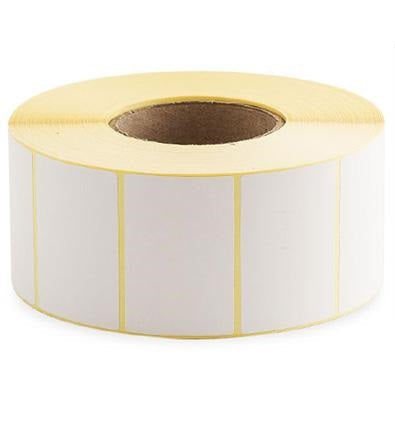
Printed Parcel Labels
76 x 52 Direct Thermal Printer Labels (Plain White) — Overview
These plain white direct thermal labels are designed for fast, reliable printing of parcel and logistics information without the need for ink, toner, or ribbons. In a direct thermal workflow, the printer’s thermal printhead activates the heat-sensitive coating on the label face to create crisp text and barcodes—ideal for high-throughput dispatch environments where speed and simplicity matter.
This product is supplied on rolls with 2,750 labels per roll in a 76 x 52 label format. They are commonly used as printed parcel labels for shipping, warehousing, and general identification tasks where a clean, high-contrast white label is required.
Key Features
Direct thermal printing (no ribbon required):
Direct thermal labels print by reacting to heat, so you can run them in compatible thermal label printers without purchasing ribbons, ink, or toner. This reduces consumable complexity and helps keep day-to-day printing straightforward.
Plain white label face for clear print contrast:
A bright white surface supports sharp black print, making addresses, routing codes, and barcodes easy to scan and read in busy packing areas.
High roll count for fewer changeovers:
With 2,750 labels per roll, you can print longer between roll changes—useful for batch printing and continuous dispatch operations.
Optimised for parcel and logistics labelling:
The 76 x 52 format is well suited to compact shipping labels, internal tracking labels, and general-purpose identification where you need enough space for key details without using an oversized label.
Clean, professional presentation:
Plain labels provide a consistent look across shipments and storage locations, supporting tidy, standardised labelling practices.
- Label size: 76 x 52
- Label type: Direct thermal
- Colour: Plain white
- Pack format: Roll
- Labels per roll: 2,750
Typical Uses
- Printed parcel labels for dispatch and courier collections
- Warehouse pick/pack identification labels
- Stock location and shelf labels (where direct thermal is suitable)
- Internal tracking labels for totes, cartons, and pallets (where a compact label is preferred)
- Returns processing and relabelling workflows
76 x 52 Direct Thermal Printer Labels — Full Product Guide
Choosing the right thermal label is about more than just the dimensions. Print method, handling conditions, and the way labels are applied all affect performance. This guide explains how direct thermal labels work, what to consider for compatibility, and how to get the best results from your 76 x 52 plain white rolls.
How It Works
Direct thermal printing uses heat to create an image on a specially coated label. When the thermal printhead heats specific points, the coating darkens to form text, lines, and barcodes. Because the label itself contains the “imaging layer,” there is no ribbon involved.
What this means in practice:
Direct thermal labels are popular for shipping and logistics because they are quick to load and easy to run. They are especially convenient for operations that want to minimise consumables and keep printers running with minimal intervention.
Materials and Construction
These labels are supplied as plain white direct thermal labels on a roll format. The key functional element is the heat-sensitive top coating that reacts to the printer’s thermal head. The roll format supports efficient printing and dispensing in packing stations and warehouse environments.
Important note:
Direct thermal labels are intended for applications where the printed information needs to remain legible for the required period under expected handling conditions. If you need long-term durability or resistance to heat, sunlight, or abrasion, a thermal transfer label (with ribbon) may be more appropriate—however, that depends on your specific workflow and environment.
Printer Compatibility
These are direct thermal labels, so they should be used in printers that support direct thermal printing. Many desktop and industrial label printers can run direct thermal media, but settings must match the label format for best results.
- Print method: Ensure the printer is set to Direct Thermal (not Thermal Transfer).
- Label size setup: Configure the label dimensions in your shipping or label software to match the 76 x 52 format.
- Sensor calibration: If your printer supports media calibration, run it after loading a new roll to help the printer detect label gaps accurately.
- Print darkness/speed: Adjust darkness and speed to achieve crisp barcodes without over-darkening.
If you’re unsure whether your printer supports this media type, check your printer’s specifications for direct thermal capability and supported roll sizes.
Floor Type Compatibility
This product is a label roll rather than a flooring product, so floor compatibility does not apply. If you are applying labels in warehouse environments, consider the surface you are labelling (e.g., cartons, poly mailers, shrink wrap) and test adhesion in your real conditions.
Health and Safety
Thermal label printing is generally a low-risk process, but good operational practice helps maintain safe and consistent output:
- Keep fingers, tools, and loose clothing clear of moving printer parts during operation.
- Switch off or pause the printer before cleaning the printhead or loading media.
- Store label rolls in a clean, dry area to reduce dust contamination that can affect print quality.
Ideal Applications and Use Cases
These 76 x 52 direct thermal labels are well suited to:
- E-commerce fulfilment: Print compact shipping labels, routing labels, or internal identifiers at the packing bench.
- 3PL and warehouse operations: Support pick/pack workflows and carton identification with consistent, scannable labels.
- Returns and relabelling: Quickly generate replacement labels without ribbon changes.
- General identification: Use for short-to-medium term labelling where direct thermal performance meets your needs.
Maintenance, Cleaning and Care
Good printer maintenance is one of the easiest ways to improve barcode quality and reduce downtime.
- Clean the printhead regularly: Dust and adhesive residue can cause streaks or faded print. Follow your printer manufacturer’s cleaning guidance.
- Keep rollers clean: Build-up on platen rollers can affect feed accuracy and print consistency.
- Store rolls correctly: Keep rolls away from excessive heat and direct sunlight to help preserve the thermal coating.
- Handle labels with clean hands: Oils and dirt can affect adhesion and print clarity.
Case Study (Example Workflow)
Scenario: A small-to-medium online retailer prints parcel labels throughout the day in batches. They want to reduce interruptions and keep packing stations simple.
Approach: By using direct thermal rolls with a high label count per roll, the team reduces the frequency of roll changes during peak periods. With the printer set to direct thermal mode and the label size configured correctly in their shipping software, they achieve consistent, scannable labels for daily dispatch.
Outcome: Faster label printing with fewer consumables to manage, supporting smoother packing and dispatch operations.
Who Is It For?
- Businesses shipping parcels daily and needing dependable, scannable labels
- Warehouses and stockrooms that rely on quick identification and tracking
- Operations that prefer the simplicity of direct thermal printing (no ribbon)
- Teams looking to minimise downtime with longer rolls and straightforward loading
Colours / Features Available
This listing is for plain white direct thermal labels. Plain white is the standard choice for shipping and logistics because it provides strong contrast for black thermal print and supports barcode scanning.
Sizes Available
This product page covers the 76 x 52 label format supplied on rolls with 2,750 labels per roll. If you require a different label size or roll configuration for your printer setup, consider checking related thermal label options within the same category.
Summary: 76 x 52 plain white direct thermal printer labels supplied on rolls (2,750 labels per roll) for printed parcel labels and general logistics identification—simple to run, fast to print, and ideal for busy dispatch environments.