
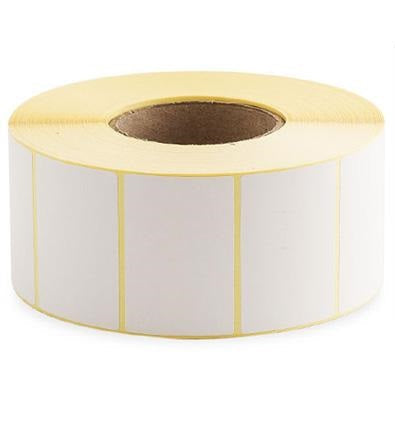
Branding / Labels / Thermal Printer Labels
-
216 X 152 - Plain White Thermal Transfer Printer Labels 1,000/rollRegular price From £0.01 GBPRegular priceUnit price per
-
152 X 216 - Plain White Thermal Transfer Printer Labels 680/rollRegular price From £0.01 GBPRegular priceUnit price per
-
138 X 25 - Plain White Thermal Transfer Printer Labels 5,500/rollRegular price From £0.01 GBPRegular priceUnit price per
-
138 X 25 - Plain White Thermal Transfer Printer Labels 5,500/rollRegular price From £0.01 GBPRegular priceUnit price per
-
127 X 152 - Plain White Thermal Transfer Printer Labels 1,000/rollRegular price From £0.01 GBPRegular priceUnit price per
-
127 X 102 - Plain White Thermal Transfer Printer Labels 1,500/rollRegular price From £0.01 GBPRegular priceUnit price per
-
127 X 64 - Plain White Thermal Transfer Printer Labels 2,300/rollRegular price From £0.01 GBPRegular priceUnit price per
-
102 X 200 - Plain White Thermal Transfer Printer Labels 750/rollRegular price From £0.01 GBPRegular priceUnit price per
-
102 X 152 - Plain White Thermal Transfer Printer Labels 1,000/rollRegular price From £0.01 GBPRegular priceUnit price per
-
102 X 102 - Plain White Thermal Transfer Printer Labels 1,500/rollRegular price From £0.01 GBPRegular priceUnit price per
-
102 X 76 - Plain White Thermal Transfer Printer Labels 2,000/rollRegular price From £0.01 GBPRegular priceUnit price per
-
102 X 64 - Plain White Thermal Transfer Printer Labels 2,300/rollRegular price From £0.01 GBPRegular priceUnit price per
-
102 X 52 - Plain White Thermal Transfer Printer Labels 2,750/rollRegular price From £0.01 GBPRegular priceUnit price per
-
89 X 25 - Plain White Thermal Transfer Printer Labels 5,500/rollRegular price From £0.01 GBPRegular priceUnit price per
-
76 X 76 - Plain White Thermal Transfer Printer Labels 2,000/rollRegular price From £0.01 GBPRegular priceUnit price per
-
76 X 51 - Plain White Thermal Transfer Printer Labels 2,750/rollRegular price From £0.01 GBPRegular priceUnit price per
-
70 X 32 - Plain White Thermal Transfer Printer Labels 4,500/rollRegular price From £0.01 GBPRegular priceUnit price per
-
52 X 52 - Plain White Thermal Transfer Printer Labels 2,750/rollRegular price From £0.01 GBPRegular priceUnit price per
-
52 X 38 - Plain White Thermal Transfer Printer Labels 3,750/rollRegular price From £0.01 GBPRegular priceUnit price per
-
52 X 26 - Plain White Thermal Transfer Printer Labels 5,000/rollRegular price From £0.01 GBPRegular priceUnit price per
-
51 X 127 - Plain White Thermal Transfer Printer Labels 1,200/rollRegular price From £0.01 GBPRegular priceUnit price per
-
38 X 38 - Plain White Thermal Transfer Printer Labels 3,800/rollRegular price From £0.01 GBPRegular priceUnit price per
-
38 X 25 - Plain White Thermal Transfer Printer Labels 5,500/rollRegular price From £0.01 GBPRegular priceUnit price per
-
25 X 32 - Plain White Thermal Transfer Printer Labels 4,500/rollRegular price From £0.01 GBPRegular priceUnit price per
-
102 X 152 - Plain White Thermal Direct Printer Labels 1,000/rollRegular price From £0.01 GBPRegular priceUnit price per
-
102 X 102 - Plain White Thermal Direct Printer Labels 1,500/rollRegular price From £0.01 GBPRegular priceUnit price per
-
102 X 76 - Plain White Thermal Direct Printer Labels 2,000/rollRegular price From £0.01 GBPRegular priceUnit price per
-
102 X 52 - Plain White Thermal Direct Printer Labels 2,750/rollRegular price From £0.01 GBPRegular priceUnit price per
-
76 X 76 - Plain White Thermal Direct Printer Labels 2,000/rollRegular price From £0.01 GBPRegular priceUnit price per
-
76 X 52 - Plain White Thermal Direct Printer Labels 2,750/rollRegular price From £0.01 GBPRegular priceUnit price per
-
52 X 52 - Plain White Thermal Direct Printer Labels 2,750/rollRegular price From £0.01 GBPRegular priceUnit price per
-
52 X 38 - Plain White Thermal Direct Printer Labels 3,750/rollRegular price From £0.01 GBPRegular priceUnit price per
-
52 X 26 - Plain White Thermal Direct Printer Labels 5,000/rollRegular price From £0.01 GBPRegular priceUnit price per
-
38 X 38 - Plain White Thermal Direct Printer Labels 3,800/rollRegular price From £0.01 GBPRegular priceUnit price per
-
38 X 25 - Plain White Thermal Direct Printer Labels 5,500/rollRegular price From £0.01 GBPRegular priceUnit price per


Branding / Labels / Thermal Printer Labels
Thermal transfer printer labels are a dependable choice when you need crisp, long-lasting barcodes, shipping information, product identification, and warehouse markings. This collection focuses on plain white thermal transfer labels supplied on rolls in a range of popular sizes, making them suitable for day-to-day logistics, inventory control, and general labeling where legibility and scan performance matter.
Thermal Printer Labels — Helpful Guide
Thermal transfer printing uses a ribbon to transfer ink onto the label surface. Compared with direct thermal labels (which darken with heat), thermal transfer labels are commonly selected when you want improved resistance to rubbing and handling, and when you need stable print for longer storage periods. Ribbon selection and printer setup are the two biggest factors that determine print quality and durability.
What’s included in this category
The products in this collection are plain white thermal transfer labels on rolls, offered in multiple widths and lengths. The size is shown as width × height (in millimetres), followed by the labels per roll. Use the size to match your application (shipping, carton ID, shelf labels, etc.) and to confirm your printer’s maximum print width.
Common label types and where they fit
-
Large-format shipping and carton labels
Designed for bigger cartons, pallets, or multi-line shipping information where you want generous space for addresses, barcodes, and handling icons. -
Standard shipping labels
A practical everyday format for courier labels, dispatch labels, and warehouse pick/pack identification. -
Product and inventory labels
Useful for SKU labels, bin labels, and general stock identification where you need a compact footprint but reliable scanning. -
Long, narrow identification labels
Often used for racking, shelving, or locations where a slim label is easier to place while still allowing a barcode and short text.
Products in this collection (with quick-use notes)
Below are examples of the sizes available in this category. Choose based on the space you need for content and the surface you’re applying to.
-
216 X 152 - Plain White Thermal Transfer Printer Labels 1,000/roll
A wide label format suited to large cartons, pallet labels, or layouts that include multiple barcodes and longer text fields. -
152 X 216 - Plain White Thermal Transfer Printer Labels 680/roll
A large label option when you need extra height for stacked information blocks, compliance text, or multiple identifiers. -
127 X 152 - Plain White Thermal Transfer Printer Labels 1,000/roll
A versatile mid-to-large format for shipping, carton identification, and warehouse workflows that require clear scanning. -
127 X 102 - Plain White Thermal Transfer Printer Labels 1,500/roll
A compact shipping/carton label size that balances space for a barcode and key text while keeping the label footprint manageable. -
127 X 64 - Plain White Thermal Transfer Printer Labels 2,300/roll
A smaller format for inventory, bin, and product identification where you want a readable barcode and short description. -
102 X 200 - Plain White Thermal Transfer Printer Labels 750/roll
A tall label format useful when you need more vertical space for text, multiple barcodes, or handling instructions. -
102 X 152 - Plain White Thermal Transfer Printer Labels 1,000/roll
A widely used shipping label size for dispatch operations, courier labels, and general warehouse identification. -
102 X 102 - Plain White Thermal Transfer Printer Labels 1,500/roll
A square format that works well for product ID, carton labels, and applications where you want a balanced layout. -
138 X 25 - Plain White Thermal Transfer Printer Labels 5,500/roll
A long, narrow label suited to shelf edges, racking, location IDs, or slim surfaces where a barcode and short text are needed. -
138 X 25 - Plain White Thermal Transfer Printer Labels 5,500/roll
Another option in the same slim format for consistent location labeling and high-volume identification needs.
Case study: reducing scan failures in a busy dispatch area
A warehouse dispatch team was experiencing intermittent scan failures at the outbound station. The issue wasn’t the scanner—it was inconsistent print density and occasional smudging from frequent handling. By standardising printer settings (darkness and speed), selecting a ribbon matched to the label stock and handling level, and ensuring the ribbon was slightly wider than the media, the team improved barcode edge definition and reduced reprints. The result was smoother pick/pack flow and fewer manual overrides at the carrier manifest stage.
How to choose the correct thermal transfer label
1) Confirm printer compatibility first
- Print method: Ensure your printer is a thermal transfer model (uses ribbon). Direct thermal-only printers cannot use thermal transfer ribbons.
- Maximum print width: Your printer must support the label width you choose. Wider labels require wide-format printers.
- Media sensing: Check whether your printer is set up for gap sensing, black mark sensing, or continuous media (depending on the label construction).
2) Choose the label size based on the information you must print
- Shipping labels: Prioritise space for address blocks, routing codes, and at least one scannable barcode with quiet zones.
- Carton and pallet labels: Consider larger formats if you need multiple barcodes (e.g., SSCC plus internal ID) or larger text for visibility at distance.
- Inventory and bin labels: Smaller formats can be ideal, but ensure the barcode module size remains scannable for your scanner distance.
3) Match ribbon type to durability needs
Ribbon choice is primarily driven by label material and the environment. For many plain white paper labels, wax or wax-resin ribbons are common choices. In general, durability increases from wax to wax-resin to resin, with resin typically used for synthetic label stocks or harsher conditions. If labels are frequently handled or rubbed, moving from wax to wax-resin can improve resistance to smudging and scratching.
4) Select an appropriate ribbon width
A practical setup tip is to use a ribbon that is slightly wider than the label/media. This helps protect the printhead from direct contact with the label edges and can reduce premature wear. Avoid using a ribbon narrower than the media width.
5) Optimise print quality (barcodes and text)
- Darkness/heat: Increase gradually until barcodes are solid without bleeding. Overheating can cause fuzzy edges and reduce scan reliability.
- Speed: Slower speeds can improve print density on some combinations of ribbon and label stock.
- Cleanliness: Keep the printhead and platen roller clean to prevent streaks and voids.
- Barcode sizing: Ensure adequate quiet zones and choose a module size appropriate for your scanner and distance.
Where thermal transfer labels are commonly used
- Warehousing and logistics: pick/pack labels, carton IDs, pallet labels, location labels
- Manufacturing: work-in-progress tracking, batch identification, internal routing labels
- Retail and eCommerce: dispatch labels, returns labels, inventory labels
- Healthcare and labs (general): internal tracking labels where legibility and durability are important (always validate material suitability for your environment)
Storage and handling tips
- Store cool and dry: Keep rolls away from heat sources and direct sunlight to maintain adhesive and face stock performance.
- Avoid contamination: Dust and oils can affect adhesion and print quality; handle rolls by the edges where possible.
- Rotate stock: Use first-in, first-out practices to reduce the chance of adhesive ageing in storage.
- Test before rollout: If you’re changing ribbon type, printer model, or application surface, run a short trial to confirm scan performance and adhesion.
Troubleshooting: common printing issues
Light print or missing sections
- Increase darkness/heat slightly and reduce speed if needed.
- Confirm ribbon is installed correctly and is compatible with your label stock.
- Clean the printhead and check for debris on the platen roller.
Smudging or poor rub resistance
- Consider a more durable ribbon type (e.g., moving from wax to wax-resin) if the label stock supports it.
- Allow printed labels to cool/set before heavy handling in fast workflows.
Barcode won’t scan reliably
- Check barcode size, quiet zones, and print contrast.
- Ensure the label surface is smooth and fully adhered (wrinkles can distort bars).
- Verify scanner settings and distance match the barcode symbology and size.
Questions & Answers
What is the difference between thermal transfer and direct thermal labels?
Thermal transfer printing uses a ribbon to transfer ink onto the label, which generally improves resistance to rubbing and handling. Direct thermal labels print without a ribbon and can be more sensitive to heat, light, and abrasion over time.
How do I choose the right ribbon for plain white thermal transfer labels?
Start by confirming the label material and how the label will be handled. Wax ribbons are commonly used for paper labels in general warehouse use. Wax-resin can improve smudge and scratch resistance. Resin is typically used for synthetic stocks or harsh conditions.
Should the ribbon be wider than the label?
Yes, it’s usually best to use a ribbon that is slightly wider than the label or media. This helps protect the printhead from contacting exposed label edges and can reduce wear, while also supporting consistent coverage across the print area.
Why do my labels print too light or with gaps?
Light print can come from low darkness settings, printing too fast, or a ribbon/label mismatch. Gradually increase darkness and reduce speed, then clean the printhead and platen roller. Also confirm the ribbon is installed correctly and is compatible with your label stock.
What label size should I use for shipping and warehouse identification?
Choose a size that fits your required content: address blocks, routing codes, and at least one scannable barcode with quiet zones. Larger cartons or multi-barcode layouts often need bigger labels, while bin and inventory labels can be smaller if barcode sizing remains scannable.