

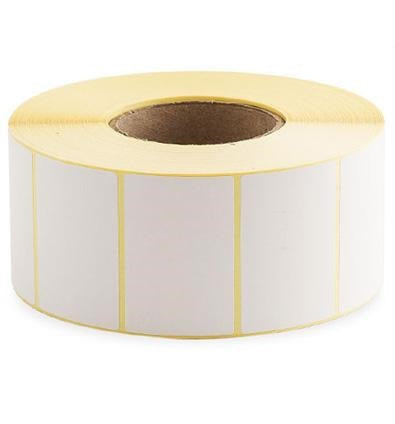
Printed Parcel Labels
Plain White Thermal Transfer Printer Labels (127 x 64) — Product Overview
These plain white thermal transfer printer labels are designed for clear, durable printing of parcel and shipping information, product identification, and general logistics labelling. Supplied on a roll format for efficient high-volume printing, they are a practical choice for busy dispatch benches, warehouses, and fulfilment operations where consistent label presentation matters.
Thermal transfer labels are intended to be printed using a thermal transfer ribbon (rather than relying on heat-sensitive direct thermal media). This printing method is widely used when you want strong print definition and improved resistance to handling, scuffing, and general wear during storage and transit.
Key Features
Thermal transfer print compatibility:
Designed for use with thermal transfer label printers that print via a ribbon, helping produce crisp text and barcodes suitable for operational scanning and identification workflows.
Plain white face stock:
A clean, neutral label surface that supports high contrast printing for addresses, routing codes, SKU information, and internal tracking labels.
Roll format for productivity:
Roll-fed labels support fast loading and continuous printing, helping reduce downtime in packing and despatch environments.
Consistent label presentation:
Uniform label sizing and a plain white finish help keep shipments and inventory clearly marked and professional-looking.
Suitable for parcel labelling:
Well suited to printed parcel labels and shipping identification where legibility and scan performance are important.
- Thermal transfer label media for ribbon-based printing
- Plain white for high-contrast text and barcode output
- Roll supply for efficient, repeatable printing
- Ideal for dispatch, warehousing, and general identification
Typical Uses
- Printed parcel labels for shipping and courier networks
- Warehouse location labels and pick/pack identification
- Inventory and stock control labels (SKUs, batch codes, dates)
- Returns labels and internal routing labels
- General product identification and logistics labelling
127 x 64 Plain White Thermal Transfer Printer Labels — Full Product Guide
Choosing the right label media is about more than just size. Print method, handling conditions, and the way labels are applied all affect performance. This guide explains what thermal transfer labels are, how they’re typically used, and what to consider when setting up your printer and workflow.
How It Works
Thermal transfer printing uses a heated printhead to transfer ink from a ribbon onto the label surface. The ribbon sits between the printhead and the label; when heat is applied, the ribbon coating melts and bonds to the label face stock. This approach is commonly selected when you want a robust printed image that stands up well to handling and movement through a packing and distribution process.
In day-to-day operations, thermal transfer printing is often used for shipping labels, barcode labels, and identification labels where clarity and consistency are essential. If your workflow involves scanning barcodes, thermal transfer printing can help maintain sharp edges and readable bars/characters.
Materials and Construction
These labels feature a plain white printable surface intended for thermal transfer printing. The roll format supports continuous printing and is commonly used in warehouse and fulfilment settings. A plain white face stock is a versatile choice because it provides a neutral background for a wide range of label designs—from simple address blocks to more complex layouts with barcodes and reference fields.
Because thermal transfer printing relies on a ribbon, the final print durability can also depend on ribbon selection. In many operations, ribbon choice is matched to the environment and the level of abrasion expected during handling. If you are unsure which ribbon type is best for your application, it’s worth checking your printer manufacturer’s recommendations and testing a small run before committing to large-scale printing.
Printer Setup and Print Quality Tips
- Confirm print method: Ensure your printer is configured for thermal transfer (ribbon) mode rather than direct thermal.
- Use the correct ribbon: Ribbon type can influence smudge resistance and clarity. Match ribbon to your printer and application.
- Calibrate sensors: Run a media calibration so the printer correctly detects label gaps and prints consistently.
- Check darkness and speed: Adjust print darkness and speed to achieve crisp barcodes without bleeding or faint output.
- Verify barcode readability: If barcodes are used, test scan performance at typical working distances.
Floor Type Compatibility
Not applicable—this product is label media for printers rather than a flooring product. If you are using these labels in a warehouse environment, consider the surfaces the labelled items will encounter (e.g., cartons, poly mailers, shrink wrap) and ensure your application method supports good adhesion and legibility.
Health and Safety
Labels are typically safe to handle in normal use. For best practice in a packing environment:
- Keep rolls stored clean and dry to maintain print quality.
- Follow printer and ribbon manufacturer guidance when loading media to avoid pinch points and to reduce the risk of misfeeds.
- Dispose of used cores and packaging responsibly.
Ideal Applications and Use Cases
These thermal transfer labels are a strong fit for operations that need reliable, repeatable printing for shipping and identification. Common scenarios include:
- E-commerce fulfilment: Printing shipping labels and internal pick/pack labels at speed.
- Warehousing and distribution: Labelling cartons, pallets, and storage locations for tracking and routing.
- Manufacturing and assembly: Work-in-progress identification and internal logistics labelling.
- Returns processing: Creating clear return routing labels and reference labels.
Maintenance, Cleaning and Care
Good media handling helps maintain consistent print quality:
- Storage: Keep label rolls in their packaging until use to protect from dust and contamination.
- Environment: Avoid excessive heat, moisture, or direct sunlight where possible, as these can affect media performance and print consistency.
- Printer care: Clean the printhead and platen roller periodically according to your printer manufacturer’s instructions to reduce streaking and improve print clarity.
- Handling: Avoid touching the printable surface excessively, as oils and debris can impact print quality.
Case Study (Typical Workflow Example)
Scenario: A small-to-medium online retailer prints shipping labels throughout the day for multiple courier services.
Challenge: The dispatch team needs labels that print clearly and remain legible through handling, sorting, and delivery.
Approach: The team uses a thermal transfer printer with an appropriate ribbon and roll-fed labels to produce consistent address blocks and barcodes. Printer calibration is performed when changing rolls to maintain alignment.
Outcome: Clear, repeatable labels support efficient packing and reliable scanning during despatch and transit.
Who is it for?
- Warehouse and fulfilment teams printing parcel labels daily
- E-commerce businesses needing consistent shipping label output
- Operations using barcode scanning for tracking and routing
- Any workplace using thermal transfer printers for identification labels
Colours / Features Available
Colour: Plain white.
Plain white labels are widely used because they provide strong contrast for black print and are suitable for a broad range of label templates and courier formats.
Sizes Available
This product listing represents a thermal transfer label option in the stated size format. As configurable listings can include multiple variants, please select the required option on the product page for the exact configuration available.
Need help choosing the right label?
If you’re matching labels to an existing printer setup, check your current roll size, core requirements, and printer specifications before ordering. If you’re unsure, a small test run can help confirm print quality and alignment for your label template.