

Printed Parcel Labels
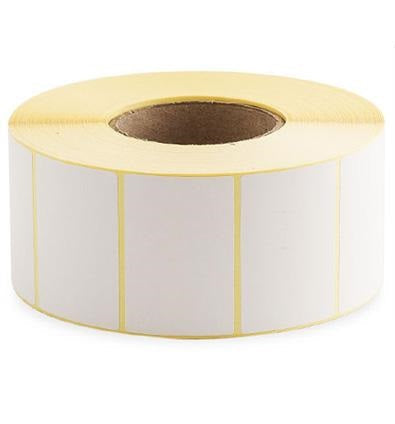
Plain White Thermal Transfer Printer Labels (127 x 102 mm) — 1,500 Labels per Roll
These plain white thermal transfer printer labels are designed for crisp, durable printing when used with a thermal transfer label printer and ribbon. With a generous roll quantity, they’re a practical choice for busy dispatch benches, warehouses, and production environments where consistent label quality matters. The 127 x 102 mm format is widely used for parcel and shipping labels, product identification, and general logistics labelling.
Because thermal transfer printing uses a ribbon to transfer ink onto the label surface, the result is typically more resistant to smudging, abrasion, and handling than many direct thermal labels—making this style a dependable option for labels that need to stay readable through packing, storage, and transit.
Key Features
Thermal transfer print performance:
Built for use with thermal transfer printers and ribbons to produce sharp text, barcodes, and graphics suitable for scanning and fast-paced operations.
Plain white label face:
A clean, high-contrast surface helps printed information stand out clearly—ideal for addresses, routing codes, SKU labels, and internal tracking.
Popular parcel-label format:
The 127 x 102 mm size is commonly used for shipping and logistics workflows, giving ample space for addresses, barcodes, and service information.
High roll count for efficiency:
Supplied as 1,500 labels per roll to reduce roll changes and keep packing lines moving.
Versatile for operations and compliance:
Suitable for a wide range of identification tasks—from dispatch labels to inventory and location labels—where durable print is beneficial.
- Thermal transfer labels for ribbon-based printing
- Plain white for maximum readability
- 127 x 102 mm label size
- 1,500 labels per roll for fewer changeovers
Typical Uses
- Parcel and shipping labels for dispatch operations
- Warehouse picking, tote, and carton identification
- Inventory and stock location labels
- Product identification and internal tracking labels
- General-purpose barcode labels where durability is important
127 x 102 Thermal Transfer Labels — Full Product Guide
Choosing the right label is about more than just size. Print method, handling conditions, and workflow all affect how well a label performs day to day. This guide explains how thermal transfer labels work, what to consider for compatibility, and how to get the best results from your printer setup.
How It Works
Thermal transfer printing uses a heated printhead to melt ink from a ribbon onto the label surface. This method is widely used in logistics and warehousing because it can produce highly legible barcodes and text that remain readable after handling. If your labels need to withstand rubbing, frequent touch points, or longer storage times, thermal transfer is often the preferred approach.
To print, you’ll typically load both the label roll and a compatible ribbon into your printer. The printer settings (such as darkness/heat and speed) are then adjusted to suit the ribbon and label combination. Once dialled in, thermal transfer can deliver consistent results across long print runs.
Materials and Construction
These labels are supplied as plain white thermal transfer printer labels. The white face stock is intended to provide strong contrast for printed information, supporting reliable barcode scanning and easy human readability. Thermal transfer labels are commonly selected when you want a more robust printed image than direct thermal printing can provide in many environments.
In practice, the overall performance of a thermal transfer label depends on the full system: label face stock, adhesive type, ribbon formulation, and printer settings. If you’re unsure which ribbon is best for your application, it’s worth testing a small quantity first to confirm print quality and durability under your real handling conditions.
Printer and Ribbon Compatibility
These are thermal transfer labels, so they are intended for printers that support thermal transfer mode and use ribbons. For best results:
- Confirm your printer supports thermal transfer printing (not direct thermal only).
- Use a ribbon type suited to your needs (for example, general-purpose ribbons for everyday shipping labels, or more durable ribbons where abrasion resistance is critical).
- Calibrate your printer for the label size and roll setup so the sensor correctly detects each label.
If you are switching from another label size, re-running calibration and checking your driver settings can prevent misfeeds and ensure the print lands correctly within the label area.
Floor Type Compatibility
These are not floor-marking labels. If you need labels for floors, racking uprights, or heavy-duty industrial surfaces, you’ll typically require specialist materials and adhesives designed for that purpose. For standard packaging, cartons, and general logistics identification, this label format is commonly used.
Health and Safety
For safe and reliable operation:
- Keep the printer clean and free of adhesive residue to reduce jams and maintain print quality.
- Follow your printer manufacturer’s guidance when cleaning the printhead—thermal printheads can be damaged by improper cleaning tools.
- Store label rolls in a clean, dry environment to help maintain adhesive performance and prevent edge damage.
Ideal Applications and Use Cases
The 127 x 102 mm format is widely used where you need a clear, scannable label with enough space for multiple data elements. Common examples include:
- Shipping and dispatch: address labels, routing labels, carrier labels, and internal dispatch identifiers.
- Warehousing: carton labels, pick/pack labels, and temporary identification for inbound/outbound goods.
- Inventory control: SKU labels, batch references, and internal tracking labels.
If your workflow includes automated scanning, thermal transfer printing can help maintain barcode clarity through handling and transit.
Maintenance, Cleaning and Care
Good label performance is closely tied to printer condition and correct setup. To keep output consistent:
- Clean the printhead regularly using appropriate cleaning materials recommended by your printer manufacturer.
- Check platen rollers for wear or debris that can cause slipping or uneven print.
- Use correct heat settings—too much heat can cause ribbon wrinkling or excessive wear; too little can reduce barcode density.
- Store rolls properly away from dust and extreme temperatures to help preserve adhesive and prevent curling.
Case Study (Example Workflow)
A typical dispatch bench prints hundreds of parcel labels per day. Using a high-count roll (1,500 labels per roll) reduces the frequency of roll changes, helping operators maintain throughput during peak periods. Thermal transfer printing supports clear, scannable barcodes and legible address information, which can reduce misreads and re-labelling during packing and carrier handover.
Who Is It For?
- Warehouses and fulfilment centres printing shipping labels at volume
- E-commerce operations needing consistent, professional-looking parcel labels
- Manufacturing and production sites requiring durable identification labels
- Any business using thermal transfer printers for barcode and logistics labelling
Colours / Features Available
This listing is for plain white thermal transfer labels. If you require coloured labels, pre-printed designs, or specialist adhesives, you may need an alternative product depending on your application.
Sizes Available
This product page covers the 127 x 102 mm label size. Sapphire product pages may include multiple purchasing options/variants; select the option that matches your required quantity and workflow.
Need help choosing the right ribbon or confirming printer compatibility?
If you share your printer model and your intended use (shipping, warehouse ID, product labels, etc.), we can help you select a suitable ribbon and settings for reliable results.